Disclaimer and Social

This page may contain affiliate links. As an Amazon Associate I earn from qualifying purchases.

Showing posts with label neopixel. Show all posts

Saturday, November 23, 2019

Lamp Adapter for USB Arduino Projects

How can I power an Arduino from a light socket? Can I retrofit an old lamp for a USB power supply? And can I adapt exiting screw-in fixtures to power my NeoPixel light shows without rewiring the lamp?

I thought this would be a simple, inexpensive purchase so I looked online for an existing solution. They have all kinds of plug-in USB adapters for wall outlets so surely they must make a version that screws into a light bulb socket. Something that I could just replace the bulb with, then plug my Arduino with NeoPixels into the shiny new USB port and have instant power for my project. Surely I'm not the only one who wants to make a light show for an old lamp.

power arduino from screw in lamp light socket
You can easily provide 5v USB power for your Arduino project from a screw in lamp or light socket.

But I could not find a version like I wanted. They do have big, bulky awkward looking versions, but not the simple, small ones like I was envisioning. They also have pre-made remote control adapters that turn the light bulbs on and off with WiFi, Bluetooth and even LORA. Then there are the popular HUE and other RGB light bulb systems.

But I wanted to make my own custom light show, so none of these commercial solutions worked for me. All I wanted was to change the screw-in socket to a USB power supply.

adapyt retrofit screw-in lamp light bulb socket for USB power and arduino
Had to resort to some antique technology to adapt an existing light fixture for USB power. I wanted to turn a screw-in light bulb socket, the kind you see in any lamp or ceiling light, to provide USB power for an Arduino. I wanted to use the Arduino and some RGB LED neopixels with Bluetooth or WiFi to make the lamp into a remote control light show. I finally had to use an ancient light socket to wall socket adapter and one of those tiny USB wall chargers to create a workable power system.


Luckily, I still have lots of electrical adapters from my days of being a budget-sensitive-photographer.

Sunday, August 12, 2018

Blacklight (UV) NeoPixel LEDs

Adafruit just released UV Blacklight NeoPixels. I've been waiting on something like this for a while. I had figured the UV light would be added to the RGB configuration like their RGBW versions. But this is really cool because all three LEDs are blacklights so you have a lot of control over their intensity.

Now you can make your costumes and festival clothing glow in the dark. Your Halloween props or stage backdrops can really pop. And your model spaceships can emit eerie lights.


LEGO Bionicle glows with UV blacklight from Adafruit's Neopixels
Add some extra pizazz to your LEGO Bionicle or other models with Adafruit's new UV Blacklight NeoPixels.

I just finished making my own portable UV Blacklight out of an old flashlight (my INSTRUCTABLE), so I remembered how much fun blacklights really are.


Make those neon mesh costumes really glow in the dark at your next music festival.


And since they are Neopixels, you can control individual LEDS and create moving patterns. Combine these with traditional RGB NeoPixels and you've got quite a light show.

Also find me on:
FACEBOOK -or- INSTRUCTABLES -or- YOUTUBE

Monday, July 16, 2018

Color-Wheel for HSB and NeoPixels

Here is a helpful color-wheel for using NeoPixels with the HSB color mode. I had to make a printable version when I switched from the RGB to HSB mode and thought I would share it here. I go into more detail on my Instructable for a visual tone piano.

HSB stands for HUE---SATURATION---BRILLIANCE and is just another way to represent the colors for NeoPixel code. I have used the RGB (red, green, blue) mode for so long the HSB mode threw me for a loop until I drew myself a picture of how it works.

I would have probably never used HSB unless Adafruit's amazing Circuit Playground board started using HSB as its beginner-friendly color mode. Now, Microsoft's MakeCode visual programming platform also offers HSB as an alternative to RGB. So I had to learn it.


HSB vs RGB color wheel space mode for Arduino Circuit Playground NeoPixels
Here's a helpful color-wheel showing how the HSB color space mode works with NeoPixels. The image also shows the basic code used to set the color on Adafruit's wonderful Circuit Playground Arduino board.


I have used RGB, CMYK and even LAB color spaces in Photoshop and Illustrator, but had always avoided HSB for some reason. So I originally felt that HSB didn't give me the precise control I was used to. However, after using it for a while I have come to like it.

Being able to set a basic color with a single number, and modify its intensity with a second (and third) number is a quick and slick method. I might not be able to get the perfect sick-acid-green or a eye-popping-pink-gold with a single color number, but honestly, I don't need to for most of my applications. The 256 mixtures of primary color duos gives me enough choices for most basic applications. And it's certainly simpler for beginners.


HSB neopixel color in Makecode for Circuit Playground
The free MakeCode online programming environment lets you play with HSB color mode. The model (upper left) shows the result of changing the values. It's a great way to try switching from RGB to HSB without even owning a board.

I was so used to mixing color in RGB and CMYK modes that I thought it was simple. Then I watched some new users struggle to make the color they wanted. It was painful just to watch and I remembered how confusing and complicated it really is. Suddenly, the HSB mode made perfect sense to use as the default color mode.

Basically, the HSB model mixes from:
  • pure red, 
  • adds some green to make yellow, 
  • then subtracts red to get pure green,
  • adds some blue to get blue-green,
  • subtracts green to get pure blue,
  • adds red to get purple,
  • and subtracts blue to return to pure red
The result is 256 hues and that's enough for most NeoPixel projects. The MakeCode environment exposes all three elemnts of HSB, so its a great way to quickly learn how to manipulate colors and intensity - you don't even need an Arduino, just used to online model and play with the values in code.


As an Amazon Associate I earn from qualifying purchases.
Shop through our Amazon links to help support this site.

Also find me on:

Tuesday, July 3, 2018

NeoPixels Behind Air Dry Clay

Tried a new material for diffusing NeoPixels and making jewelry - air dry clay. It didn't work out like I hoped, but the experiments were successful enough that I will continue to play with it.

Air-dry clay is very easy to work with. I think it handles more like real clay than polymer-clays like Sculpey. And you don't have to bake it, just let it dry (a real plus during the summer months).

I also use it to make quick molds and impressions.

I had some white clay (from Polyform) left over from another project, and I don't like to mix partially dried clay back into the main blob. So I decided to press some gears and cogs into the leftover clay to make a quick Steampunk jewelry pendant. With some paint and embellishments, this is a good technique to get a fun surface texture for jewelry.

I thought it would be translucent enough to make a good diffuser for a NeoPixel pendant. But the clay is actually fairly opaque at anything more than a millimeter thickness. That is way too thin to make jewelry with because air-dry clay is brittle and breaks easily (a backer board or thick parts are best for jewelry).


Steampunk jewelry pendant made with air dy clay and NeoPixels
You can see that the NeoPixel lights only show through where the clay is very thin. Luckily, the rest of the pendant is thick and makes for a strurdy piece of Steampunk jewelry.


But I had accidently made some of the impressions from the gear so deep that the light from the NeoPixels shined through quite nicely. A few even poked all the way through. The rest of the piece are very thick however, so the pendant is sturdy. Overall, it creates a nice effect.

I need to paint the surfaces to make it prettier, but somehow leave the indentions unpainted. It might take a few tries to get something attractive. But air-dry clay is cheap and quick to work with. So I can try a lot of different techniques cheaply and quickly.

Also, I know that polymer clays have a wide variety of translucency. And my diffusing experiment with 3d printed NeoPixel jewelry proves that even PLA has different light transmitting qualities. So there might be other air-dry clay brands that work much better with technique. I'll keep you updated.

Also find me on:
FACEBOOK -or- INSTRUCTABLES -or- YOUTUBE

Friday, May 11, 2018

8-Bar plus 24-Ring equals NeoPixel Belt Buckle

Sometimes being slightly disorganized works in your favor. I keep a tray filled with every size and shape of NeoPixels. The tray lives near my electronics work station. When I find a nifty part and want to see if a NeoPixel will fit that part, I simply reach into the tray and grab an example to test.

The collection comes in very handy so I leave the LEDs in the tray at all times. I know I should put them back in their anti-static bags and put the protected LEDs back in the main collection. But I don't because, well... because I'm kind of lazy.

This week, I started playing with electronics again after taking several months off for other project types. And when I pulled out some NeoPixels to test fit onto a part I got a pleasant surprise.

Neopixel 8 bar and 24 ring as jewelry
Notice how perfectly the 8-pixel bar and the 24-pixel ring fit together


The 8-pixel bar and the 24-pixel ring had stuck together and came out of the tray as a pair. The combination created a perfect shape for a belt buckle, or broach, or maybe a hair ornament. I'll have to cover them of course, and hook them up to an Arduino. I just finished playing with decorative round covers exactly for this purpose.

Finding this combination by accident is funny. I have tested all the ring sizes in various combinations. There are enough different sizes of NeoPixel rings that you can make many combinations of concentric rings - including an LED clock with 60 pixels for the second hand.


But for some reason I had never combined or even tested the bar together with the rings. I felt silly, but happy because the universe had gifted me a new combination without me even searching for it. I think maybe I'm supposed to make a few pieces of light-up jewelry as my transition back into my electronics hobby.

Find out more about NeoPixels at Adafruit. (the 8-bar and 24-ring are two of my favorites). By now, Adafruit has the same configurations in RGB, RGB plus white (in several Kelvin colors) and even a version with faster refresh rates called DotStars.

If you've never hooked them up to your Arduino before, grab yourself some NeoPixels and start lighting up your world.


As an Amazon Associate I earn from qualifying purchases.
Shop through our Amazon links to help support this site.

Also find me on:

Thursday, May 10, 2018

Will It Go Round in Circles - The Wash(er) Cycle

In the previous post I showed some of the paper-on-metal jewelry I've made. This post is about the process I used to create them. It's a pretty basic concept, but I like the results. I haven't played with it this year, but I just found some left-overs from last year and remembered how fun it can be.

Steampunk Paper from Silhouette cameo craft cutter on metal washer jewelry necklace
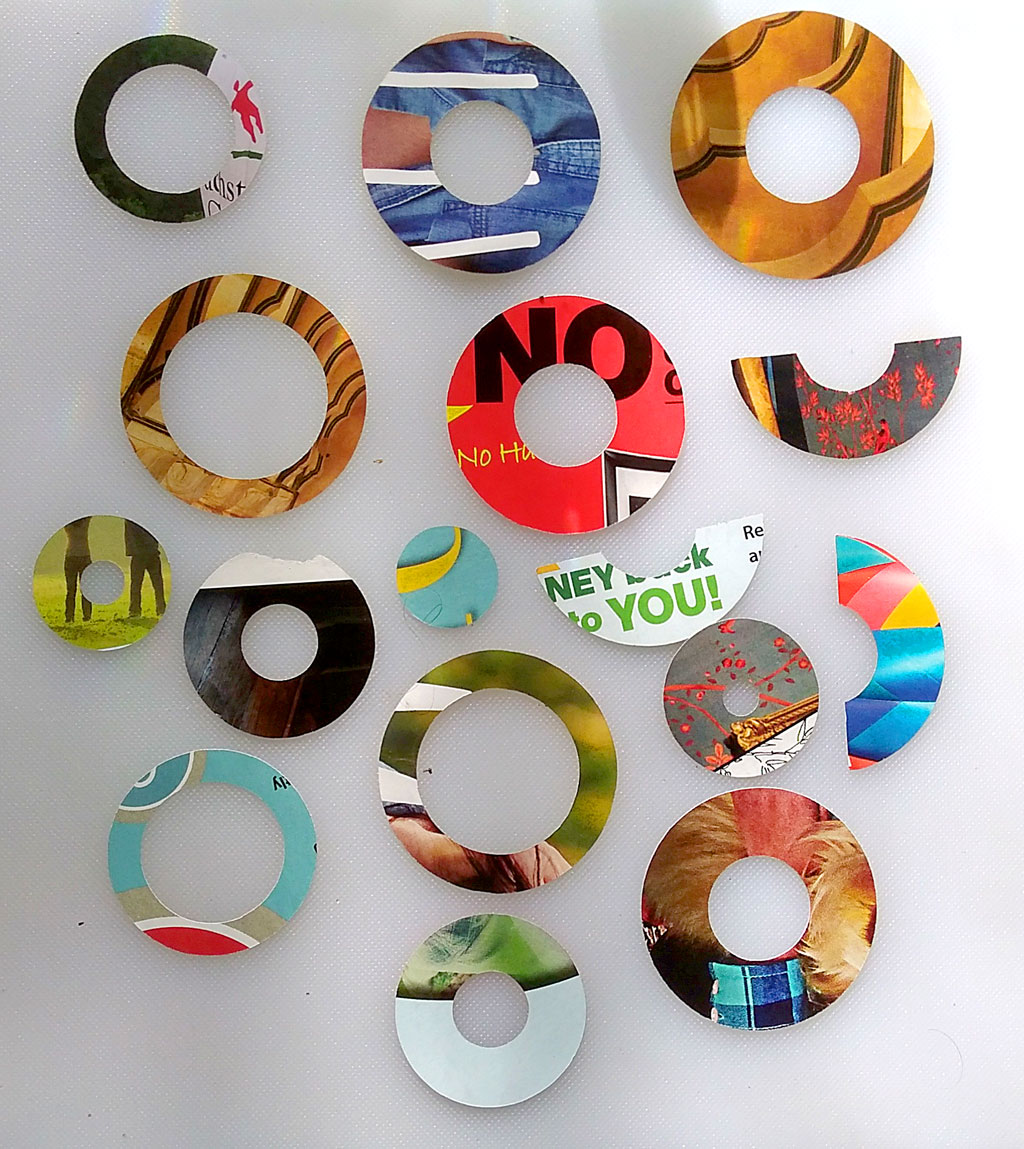
I started using random pages from magazines. I would just pick a page that had an interesting color, pattern or composition - then just slap it onto the Cameo's cutting pad and cut away. As you can see, the results are varied and fun. Artistically, they are more difficult to work with than my early experiments with scrapbooking paper. The colors and shapes and random hints of words make it a challenge to create a cohesive piece of jewelry with them. And that's why they are so much fun.

I started using washers in jewelry projects because they are perfect sizes to cover NeoPixel rings. I started putting the bright NeoPixel LEDs into jewelry before I had a 3d printer. I liked the results and even published an Instructable on how I made one. As you can tell from the photos, I needed something to cover the NeoPixels with since they are so bright.


(I've also used washers in other non-jewelry projects like my welded washer bowl.)

Finding square and rectangular covers is easy, you can make attractive jewelry with a variety of materials. Squares and rectangles are also easy to cut or fabricate. But making perfect circles, especially concentric circles - well that's harder and often very tedious and time consuming. That's why I defaulted to washers at first.


I spray painted a few and used nail polish on others. When I added some bling the washers kind of worked as jewelry. But I still wanted something else, that little something extra. I kept seeing paper and cloth that I likes and kept wishing I could somehow get them onto the washer. But cutting them to fit would be a pain.

Then I remembered I had a craft cutter -Duh!!! - that's why I got the Silhouette Cameo in the first place.

Steampunk Paper from Silhouette cameo craft cutter on metal washer jewelry necklace
The Silhouette design software made it easy to create a template. Notice that I also included some half-rounds, insets and off-center parts. This gave me a lot of options to work with.


Steampunk Paper from Silhouette cameo craft cutter on metal washer jewelry necklace
I started by cutting decorative paper from the scrapbooking section of the craft store. This made it easy to design because the colors and motifs were modern and already geared towards the craft market. Later, I started using random pages from magazines and that forced me to really work to find a color scheme and composition that worked.


So I decided to make some paper circles with a Silhouette Cameo craft cutter machine (I so smart). I measured the washers and used those dimensions to draw circles in the Silhouette design software. I drew circles for several of the washer sizes. And I added some half-rounds, some offset and off-center versions as well. That way I have a variety of shapes to play with and overlay on top of each other.


It worked, a few minutes later I had a large selection of paper circles to use. I played with them for days. And of course I had to add bling, extra paint and glitter to some of them.

One thing I liked about this technique is the randomness of the result. You can use the design software to place the cuts exactly where you want. But letting the cuts fall wherever all random and weird, that gave me a treasure trove of chaotic suggestions.

Steampunk Paper from Silhouette cameo craft cutter on metal washer jewelry necklace
This os one of the offset (inset?) rings. See how it's smaller than the washer and forms a decorative stripe instead of covering the entire washer. I hit the edges of the paper with some ink from a stamp pad to make it stand out. The washer was painted with some nail polish. And I covered the entire surface with a finishing seal coat of glitter polish.

I have a least several hundred paper circles left. I'm not sure how many more pieces of jewelry I'll create with this technique (at least for this year). But I wanted to document and share the technique before it got buried and forgotten somewhere in the studio.

Plus, now that I have a 3d printer I've started to play with creating custom shells for the jewelry, so I might not get back to this technique for quite a while.


Also find me on:
FACEBOOK -or- INSTRUCTABLES -or- YOUTUBE

Tuesday, January 2, 2018

Jewelry that Flickers and Flits with Pictures

Here's another way to add beautiful lighting effects to your jewelry. Tiny, inexpensive graphic screens are easy to embed in your projects. They aren't as bright and showy as LEDs like Neopixels, but they give you the ability to craft very customized light and color effects. You can animate them and even display images. And of course you can control them with an Arduino.


A really simple pattern adds a lot of visual interest to this millefiori piece. The pattern changes slowly over time to give the pendant a constantly transforming appearance. The light really helps draw the eye in dim lighting. If you don't want that, simply turn off the screen. You can create any pattern, animation or even image that you want and change them as slowy or quickly as you desire.

I'm going to use fused glass as an example again. I like to work with fused glass because it poses so many challenges and can have so many different forms. Each piece is unique and calls for a careful pairing of light.

And because fused glass is pretty all by itself, it's also challenging not to overpower the innate beauty of the material. Last week I posted about using a simple LCD light valve to add interest. That works well with semi-transparent glass.You can also use these tiny graphics screens to add patterns and lights to the same piece of glass.

However, I have struggled to find something that woks well with clear glass pieces. Nothing ever worked well in pieces that had areas of transparent glass. So I hauled out my LCD screen collection and tried some of them. I think this technique has some definite possibilities.


Both Adafruit and Sparkfun have a wide range of sizes and form factors for these types of screens. For jewelry, the "deck of cards" size is probably the biggest you would need for your largest statement pendant. I prefer the matchbook sized ones. I have played with the tiny thumbnail sized versions, but after getting diffused there isn't that much difference between them and a much cheaper LED.

Here are just a few of the screen sizes available. (That's a US quarter for scale)


There are a few things to remember when choosing a screen:

If you want to display actual images then you need to make sure the screen comes with an SD card slot so you can store the image or images.

Don't forget about the monochrome black-and-white versions if all you need is a gentle flicker. There are also versions where the entire screen can be any single color and you can draw in black.

The faster your microprocessor is the faster you can change the screen display. This might not be important to you. I can code and design animations well enough to get small chips to do what I need. But if you want to do fancy animations consider using a more powerful chip like the M0. With the Pi Zero, you could even play videos using the same screens.

You can use traditional tools like Photoshop or Illustrator to create your patterns and images. For people who don't code, this makes this technique much more accessible. You an also use code to draw over and manipulate images, so it offers the best of both worlds.


I will keep using the LEDs and NeoPixels for jewel based. big bling style projects. And the 3d printed jewelry actually needs all the brightness NeoPixels provide just to show through the plastic during daytime.

But the more I play with LCD graphic screens and glass the more possibilities I see. I've got several ideas, and the really neat thing about his technique is that you can leave the screen off to emphasize the beauty of the glass itself - or you can show any solid color, pattern, animation or image on the exact same piece.

In fact, the same piece of glass can be given a completely new "look" by changing what's on the display.

I'll post more images of my experiments soon, and I think I might need to start doing video just to better demonstrate the effects possible with this combo.


Also find me on: FACEBOOK 


Sunday, December 17, 2017

New Side Light NeoPixels make Complex Effects Easier

Adafruit just released a new "Side Light" style of NeoPixels with the LEDs perpendicular to the ribbon instead of parallel. This might seem like a simple thing to some folks. But for anyone who has tried to illuminate a circular or tubular object with a wash or raking style of light, this is amazing stuff.

Oh so simple, but so very helpful. Adafruit now has a 90 degree side light version of their Neopixels.


Until now, the LED strips always projected light away from the curved surface. The light went toward the viewer, not along the surface of the curve. So for the most part, we were limited to having bright strips of light shining at the viewer but not on the object. Now, it's going to be so much simpler to gently illuminate the surface of an object without blinding the viewer or requiring additional, often complicated reflectors to disperse the light.


We can finally throw a wash along a curved surface (LEDs at bottom) instead of projecting all the light out into space (top). 

In fact, these new strips negate years of my work (slight exaggeration) where I created reflectors and deflectors to control the light and bend it to go opposite the curve of the LED ribbon. And I'm not the only one, lots of makers have come up with their own solutions. After all, that's what makers do - we create solutions and have a lot of fun doing it. But I think we all knew there was a better way, we just never got around to creating it.

With cosplay and illuminated, glowing fashion becoming trendy and popular it was only a matter of time before someone came out with a manufactured solution. Adafruit popularized the addressable LED and made it simple enough to use that regular people could create with it. They named it NeoPixel and the world was never the same

Luckily for us, Adafruit is now working closely with Erin St Blaine, a professional costumer and performer. According to Lady Ada, the new Side Light style was initiated by St Blaine. While we amateurs tinkered and fussed to overcome the limitations of the basic NeoPixels, St Blaine spoke up for us and let the company know that she and other pros needed a simpler pre-made solution. And Adafruit responded. We amateurs also reap the benefits, yay us.

Right now, there are only a few configurations available in the side lit style, but if there is a good response I'm guessing Adafruit will expand the line. So come on folks, grab yourself a few of these strips and make something cool so we all get more options to choose from.

My project list for these new lights include:
  • Hat with the with a side-lit crown taper
  • Hat with a down light brim
  • Bracelet that throws patterned light on the arm
  • Skirt with a true down light
  • Cropped sweater with a real down light
Did you notice that all of these projects involve the human body as the subject of illumination? Well that's because the human body is basically a series of vertical tubes, Until now. we could wrap lights around the body so that the illumination projected AWAY from the surface of the body - basically creating a brightly outlined stick figure. But it was very difficult to illuminate the surfaces of the body without a lot of tricky workarounds. The always lights pointed away simply because that's how they were made.


I tried to work with illuminated clothes a few times with very limited and mixed success. After a lot of work and tears and carefully sewing in reflectors, the clothes still looked like they belonged on a Vegas stage. I had grand visions of creating decorative reflectors that looked like attractive and intentional embellishments, but only succeeded in making awkward boxes that looked like they were tacked on to hide the LEDs.

I love creating diffusers and reflectors for NeoPixels. ten hours of measuring, designing, printing and installing later and you've got yourself a nice project. But hey, now you can do a lot of the same thing just by using the appropriate strip of NeoPixels.

I, like so many others, defaulted back to EL-wire for light-up fashion. It's a lot less complicated, but much more limited than LEDs.

That's why I decided to stick to jewelry where it was easier to hide reflectors and such.  So I'm excited to re-try some of these failed fashion projects.

Other people seem really excited about making light-up signs and displays. It will certainly make that easier too. I'm also eager to try out mixing the two configurations to create a wall wash of one color with a center strip of another color.

Conclusion:
This is a face-palm simple upgrade that just required a large enough community plus a dedicated creator to speak-up to a responsive company. Now we all have a fantastic new set of lighting tools to use. I can't wait to see what everyone comes up with,


Also find me on: FACEBOOK 


Tuesday, November 21, 2017

Light-up Cosplay Boots may be happening

Both my hiking-boots and my work-boots completely wore out this summer. Cracked soles, popped rivets and split seams now make them useless for their intended tasks. However, their well-worn look gives them a lot of character and makes them good candidates for some sci-fi cosplay modifications.


I think it's time to revisit light-up shoe projects. Slap some LEDs or some EL-wire on those suckers and call the space-bound. I've already done lighting projects with tennis shoes and with high heels. But this time, it's going to be a little more industrial looking.

I might just add some glowing EL-wire panels to the boots and call it done,


I might keep it simple and just use some simple EL-wire or maybe some EL-panels. That's certainly easy to do. But of curse I have grand ideas about controllable light shows like in the summer blockbuster movies. I have some spare microcontrollers and extra LEDs in the shop that are taunting me from their dusty shelf.

And new products like the sensor laden Circuit Playground and the Bluetooth or LORA Feather boards suddenly make real interactive and controllable light shows possible for a reasonable price. My previous projects were limited to a few pre-set, repetitive light sequences and simple pressure-switches.

I haven't done any real designs yet, not even a single sketch - so I don't have anything to show you for now. However, I've done acceleration projects and sound based projects with the Playground, and my Bluetooth skills are coming along nicely. If I combine these with my old Neopixel controller code I might have a good start on some off-world footwear.

I still needed to refresh my memory on how these things are done - so I went back and re-found some of my favorite inspirational projects and tutorials. This time I decided to take notes and make an easy to use collection of helpful links and I thought I would share them here..


Most of the tutorials and guides I knew of all revolve around either sneakers or high heels. You know, normal everyday footwear - not the stuff of exo-planet explorers. But it's all I could find, so here's a list of my favorites to get you started:.

Sneakers and Tennis-shoes


Heels


Above and Beyond


Right now, I'm thinking some rack-mount headlights, some basic running lights and some sound reactive and acceleration reactive lights. Since these are boots, I can add some clunky control panels without destroying the lines of the shoe - big and clunky work well with boots.

If you have any ideas, images or tips to share for cosplay boots, please send them my way. I'll try to post up some progress pics soon.

Also find me on: FACEBOOK


Monday, May 22, 2017

Glowing Pendant - First Enamel Experiment


Trying to create a pendant necklace that glows during the day as well as at night. Finally found some basic techniques that work with my 3d printer and regular filament. It's far from perfect, but the first, quickly printed piece looks good enough that I will continue to experiment and refine the idea.

This is what the pendant looks like during the day. The NeoPixels light up the thinner areas quite well and show up even in bright, outdoor light. The "stringing" doesn't show up as much in real life, but it is present. I printed this at high speed with a thick layer height. If I print a more hi-rez version the stripes should be a lot less noticeable.


This first piece has a lot of experiments built in: How does thickness affect the amount of light transmitted, how does thinning the front, back or both affect the look, can I "trap" the light in the thinned areas, and how do two lights show up within one thinned recess?


I learned a lot on this first iteration. I won't bore you with the details, but I will note that the difference between a nice glow, a stringy mess and nearly opaque can be a matter of 0.01 mm. That's a pretty tight tolerance.

As you can see below, even at night, the thicker areas block the light quickly.

I will need to try out other filaments to see if they give me more latitude in thicknesses while maintaining the diffuse look.

Glowing pendant with Adafruit Circuit Playground inside a E-sun PLA cover
And here is what the pendant looks like at night with the LEDs at full strength. I think it's pretty, but you can also dim the lights easily. And since these LEDs are on board the Circuit Playground board, you could also get the lights to react to sound, movement, heat or just randomly.

You might have noticed the curving incised lines. They are very deeply cut, so they transmit more of the light. I wanted to see what they looked like. I had hoped they would create a gradient as they carried the colored light from multiple LEDs. It kind of works.

But there was also a second reason for them. I wanted to try embedding wire in them, then pour enamel paint (okay, cheap nail polish - same thing) in between the wires like a cheap, faux cloisonné.


I did a first, tentative experiment with the nail polish. I selected different colors, styles and brands to see how they affected the light. I did not select the colors for a pleasing composition - and boy, did it turn out ugly in the daylight.

But the nail polish does affect the quality of the transmitted light. Once again, the results didn't adhere to my predictions. Chalky does not block more light and sparkly daylight posihs does not sparkle at night, even when lit.

This shows the pendant at night after I added some enamel paint (aka nail polish). It does affect the colors and somewhat smooth's out the stripes. Some colors and thickness kills a lot of the light, so I will have to learn which brands of nail polish work for this project. Even though it's the dimmest area, the red dot at the lower left is closest to the affect I wanted to achieve.

The thickness of the nail polish does affect how much light gets through. But I was happy to see that almost all the paint can be applied thickly with no significant negative affects. That's great, because I really want to just pour the paint into the recesses and not have to struggle to get an even coat with a brush.

All in all, I'm very happy with this first try. Expect to see more about this technique in the near future.

I used the Circuit Playground board from Adafruit - get  it at Amazon.


Also find me on:
FACEBOOK -or- INSTRUCTABLES -or- YOUTUBE


Saturday, May 13, 2017

Throwing Light #3 - Masks and Gobos


Now that I know some basic ways to "throw" light (see Part 1 and Part 2 of the series), I wanted to explore how to shape the rays into specific patterns. To find out, I printed a quick (and sloppy) series of masks to test how they affected the shape and quality of light.

Like the previous experiments, I used the Circuit Playground board from Adafruit. I used the larger, deeper version of the 3D printed medallion I created in Part 2. The masks fit over the front of the openings in the light channels. I did not realize how much light would leak out from around the masks (as you can see in the photos) but the masks are enough to test some basic techniques.


The version of the medallion with a reflective interior (at right in the photo above) was not affected by the masks; it's almost useless. But the masks do have a pronounced affect on the raw black PLA version at the left.


The 3D printed set of masks (in red) sits under Circuit Playground board. The Medallion slips over the top of this assembly.
Surprises and Successes

I have played with masks and gobos for photography and stage lighting, so I sort of knew what to expect from the different shape. But the sizes and distances are so much smaller here that I expected some slight differences.

Most of the masks gave the expected results, but there were a few surprises:


The biggest surprise came with the "posts" mask. I printed one set of 1x1mm posts and a second set that was also 1mm wide but 4mm deep. I expected the deeper posts to cast the stronger shadow like it does in a large scale mask. Instead, the skinny 1x1 posts yielded the more precise shadows. I think this might be because of the small scale. The sides of the larger posts may reflect so much light that the shadow gets diffused from all the scattered light.

I was also hoping that the masks might be strong enough to shape the light from the reflectively painted version of the medallion. Unfortunately, the scattering overpowered the masks and there was negligible shaping from the masks.

SURPRISE!!! The skinny 1x1 posts actually created a stronger shadow that the deeper posts. I think the sides of the deep posts reflect and scatter too much light and negate the mask's shadow making. This is true even with the reflective version.

Bigger is better - sometimes. I wanted to see if a pinhole was large enough to create a visible ray -it was NOT!!! However, the larger round hole did emit a slightly shaped ray.


The vertical slot worked as expected, The diagonal slot worked sort of like I expected (a slight gradient) but it is the only shape that actually worked better with the reflective interior (see comparison photo above)

Aha, these worked exactly as expected. The "high slot" caused the beam to appear at a distance from the opening of the light channel.


Be sure to check out Part 1 and Part 2 of the series

Also find me on:
FACEBOOK -or- INSTRUCTABLES -or- YOUTUBE


Friday, March 17, 2017

Throwing Light #2 - Channel Size & Angled Reflector


Learned a lot about the basics of throwing and controlling light from NeoPixels in Part-1 of this series. But I wasn't getting the amount of light I wanted, probably because I was using a 3v board instead of a 5v - the LEDs are simply not as bright as I'm used to.

I decided to see if bigger "channels" would allow more light to be output, and whether adding a 45 degree "reflector" over the NeoPixels would help project more light.

The answer to both questions is YES: larger light channels do help, and an angled reflector helps (especially when silvered). And painting the channel with silver paint makes a huge differences at both sizes.


The design of the medallion remains essentially the same except for the increased depth of the channels.


Do Bigger Channels Make Brighter Light Rays

Yes, more light escapes from bigger channels. But to make a noticeable difference, I had to make the much larger. So much larger that it makes the pendant slightly bulky, almost 8mm total thickness. And, it is so large I could now put a strip of NeoPixels "on edge" and project the light directly down the channel instead of bouncing it 90 degrees.

To test, I printed the thinnest pendant I could, with the channel's top only about 1mm above the face of the LED. Then I printed another one with roof about 4mm above the NeoPixel. You can see the results below.

With the raw black PLA the difference is noticeable, but not extreme (blue light). The difference is much more pronounced when the interior of the channels is painted with silver paint (shown in red at bottom of page)


A comparison of the amount of light coming out of a 1x4mm channel (top) and a larger 4x4mm channel (bottom). Notice that there is a distinct difference in the amount of light emitted from the two channels. This is the raw black PLA print. Even more light is emitted when the interior of the channel is painted with reflective paint.

Do Angled Reflector Surfaces Really Work
Yes, especially if the reflector-panel is painted with silver paint. The raw black PLA does reflect some additional light from the angled surface (blue image). But if the angled surface is painted silver, then the effect is much more pronounced. Unfortunately, the silver also scatters the light in all direction, making the "ray" shape less pronounced.

I wonder if only painting the angled surface, but not the rest of the channel would be "the best of both worlds" - bouncing more light, but scattering it less. Or maybe a tiny mosaic mirror would be ideal for reflecting and directing light. But as noted, at this thickness, the NeoPixels could be mounted vertically, negating the need for any reflector altogether.

An angled surface (shown at right above) was added to one half of the medallion. I wanted to see if the angled surface would reflect more light from the LEDs (shown as the red boxes).

Even the raw black PLA shoes a small increase in the amount of light when using an angled surface.


When the interior surfaces of the channels are painted silver, the
amount of light reflected off the angled surfaces increases dramatically.


Next, in Part 3, I experiment with gobos and patterns to throw shapes with the light rays


Also find me on:
FACEBOOK -or- INSTRUCTABLES -or- YOUTUBE